
 11
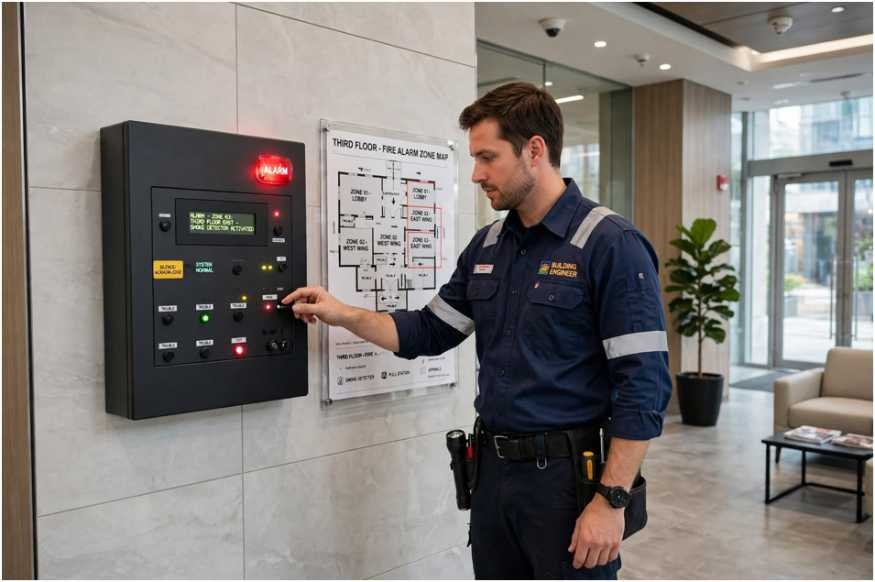
Knowing how to turn off fire alarm in commercial building systems is a controlled procedure, not a frantic scramble to yank a pull station or smother a horn with a jacket. The signal will not silence itself, and the panel will not forgive a wrong code sequence entered under pressure. What separates a two-minute nuisance reset from a full building evacuation and a fire department response is whether the person at the keypad understands what the system is actually telling them.
Most false activations in commercial properties trace back to a predictable set of causes: cooking smoke near a corridor detector, dust from a renovation crew, steam from a bathroom vent, or a sensor that has simply aged past its service life.
The Facilities Management Association has noted for years that nuisance alarms represent the single largest category of fire service calls to commercial occupancies, and each one carries a real cost in lost work hours and damaged trust with tenants. The procedure below reflects how licensed technicians actually approach how to turn off fire alarm in commercial building panels, including the parts most building staff get wrong on the first attempt.
The governing rule for every addressable or conventional panel is identical: acknowledge first, silence second, investigate third, reset last. Pressing reset before you have identified the initiating device puts the system back into normal supervisory mode with the fault still live, and the alarm will re-trigger within minutes, often after the fire department has already been dispatched. The National Fire Protection Association publishes the inspection and testing standard that governs these systems under NFPA 72, the National Fire Alarm and Signaling Code, and the reset discipline it describes exists precisely because premature resets are the most common operator error.
Here is the sequence a trained building engineer follows when learning how to turn off fire alarm in commercial building equipment without creating a second event:
Some panels also carry a separate DRILL or LAMP TEST button, and pressing those during an active alarm will confuse the sequence. Read the panel faceplate, not the manual you left in the truck.
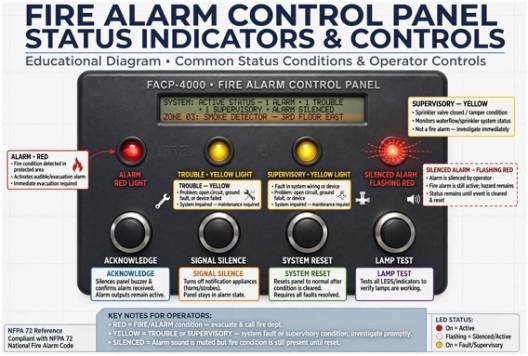
The display readout is the single most valuable piece of information in the entire event. A device labeled “SD-14 Corridor East” tells you a smoke detector on the fourteenth floor east wing tripped, while “Pull Station 3 Lobby” tells you a human pulled it. Those are two entirely different investigations. Smoke detectors react to particulate, and a detector that trips in a kitchen-adjacent corridor is almost always responding to cooking effluent rather than fire. A pull station activation means someone saw something or someone decided to be clever, and you need to know which.
When learning how to turn off fire alarm in commercial building zones that cover large areas, addressable systems give you a decisive advantage because each device reports its own identity. Conventional zoning systems only tell you which zone, which might cover an entire floor, so the walk to confirm the cause takes longer. The U.S. Fire Administration maintains guidance on alarm system types and their role in early warning, and it is worth reading their material because it reinforces that a silenced alarm is still a live alarm until the cause is confirmed.
Two device categories account for most false trips:
Duct smoke detectors sit inside air handling units and are frequently overlooked during investigation, yet they trip on belt dust and filter debris and will re-trigger every time the air handler cycles until the sensor is cleaned.
There is a category of activation where silencing loses you time. If the panel reports multiple devices across separate zones, or if the display is cycling through device after device in rapid succession, that pattern indicates either a genuine developing event or a system-wide fault such as a water leak into a riser or a ground fault in the signaling circuit. In those cases, the correct action is to leave the alarm sounding, call 911, and get people moving. Silencing a multi-zone activation to “see what happens” has ended badly in enough documented incidents that no facility manager should treat it as a judgment call.
The same caution applies to any activation in a building with sleeping occupants, including hotels and residential care facilities, where the alarm’s purpose is to wake people who cannot self-evacuate. The OSHA standard for employee alarm systems, 29 CFR 1910.165, sets requirements for alarm signaling in workplaces, and it makes clear that the alarm must remain distinguishable and effective, which is incompatible with repeated casual silencing by untrained staff.
The single biggest source of confusion in how to turn off fire alarm in commercial building controls is that operators do not know whether the panel is in ALARM, TROUBLE, or SUPERVISORY. Those three states look similar on a dark display but require completely different responses. The table below is the reference most building engineers keep taped inside the panel door.
| Panel Status | What It Indicates | Correct Action | Reset Allowed?
|
|---|---|---|---|
| ALARM (red) | An initiating device has activated. Horns and strobes are sounding. | Acknowledge, signal silence, locate device, investigate. | Only after zone is confirmed clear |
| TROUBLE (yellow) | Open circuit, ground fault, or a device has gone missing from the loop. | Do not reset repeatedly. Log the fault and call the service provider. | No, it will recur |
| SUPERVISORY (yellow) | A valve on the sprinkler system has closed, or a tamper switch has tripped. | Check the sprinkler control valves and restore them. | After valve is restored |
| SILENCED ALARM (red, flashing) | Audible devices are off but the alarm condition is still active. | Continue investigation. System will re-sound if a new device trips. | Not until cause is found |
A trouble condition that operators keep resetting is a system asking for maintenance. Repeated resets on a supervisory condition can mask a closed sprinkler valve, which is a far more serious problem than the alarm the staff is trying to stop.
The panel code is a permission, not a convenience. Distributing a shared facility code to every shift supervisor and maintenance tech is the fastest way to produce a building where nobody knows who silenced what and when. NFPA 72 requires that a record of system events be maintained, and modern addressable panels log every acknowledge, silence, and reset with a timestamp and user code—rigorous documentation that also supports compliance reviews for green building certifications. If your panel does not prompt for a unique code per user, that is a configuration gap worth closing.
A practical permission tier looks like this:
Anything above Level 2 in a general staff roster is an audit finding waiting to happen. Fire marshals reviewing incidents have become considerably less tolerant of shared codes since the widespread adoption of addressable systems with user logging.
Every silenced alarm needs a paper trail. The log entry should record the date and time of activation, the device or zone reported, the name of the person who silenced the panel, the visual inspection findings, the time of reset, and whether the fire department responded. That record is what your insurance carrier and your alarm contractor will ask for if the same detector trips three times in a month, and it is what proves your staff followed procedure if a nuisance alarm ever turns out to have been real.
The National Fire Protection Association notes in its system documentation guidance that event logs from the panel itself should be downloaded periodically, since most panels have a finite memory buffer that overwrites older events. Connecting the panel to a cloud monitoring platform or an integrated building automation system has become common in mid-size commercial properties precisely because it preserves that history automatically and gives the alarm contractor remote visibility before a service truck rolls.
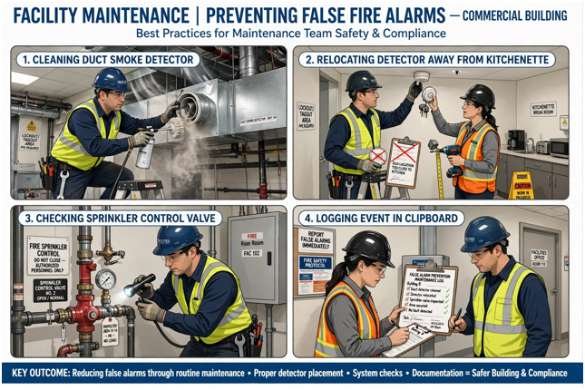
Most of the effort in how to turn off fire alarm in commercial building systems is wasted if the underlying cause is not addressed. A detector that tripped on cooking smoke will trip again the next time someone runs the toaster oven. A duct detector fouled with belt dust will fire every time the air handler starts. Facility teams that deal with fewer nuisance alarms tend to practice a small set of habits:
The bypass in item four is not a shortcut. A proper bypass is documented, time limited, and approved by the alarm contractor or the authority having jurisdiction, and the system is restored and tested before the contractor packs up.
Any recurring trouble condition, any device that fails its sensitivity test, any panel that will not accept a reset, and any activation involving a sprinkler flow switch should route directly to the service provider. Field technicians report that a substantial portion of their emergency calls are panels that have been reset dozens of times by staff trying to clear a fault that required a device replacement. A panel that will not reset is telling you something is physically wrong with the loop, and continued resetting wears the notification appliance circuits and can eventually damage the panel itself.
The system is also not the place for improvisation during a genuine event. A fire alarm that has been silenced can be re-triggered by the next device that trips, and a building full of people who have been told the alarm was a mistake is a building that will ignore the next one. The operational discipline that matters most is the one your staff exercises before they ever touch the panel: knowing which code they hold, knowing where the panel is, and knowing that the display readout is the first thing to read and the last thing to ignore. Any facility that trains that reflex into its shift leads will spend far less time puzzling over how to turn off fire alarm in commercial building panels and far more time on the work the building actually exists to do.